3. Mapper XML & SQL Statements
A Mapper XML file (mybatis-3-mapper.dtd) binds a Java Mapper interface (namespace="...") to SQL statements (<select>, <insert>, <update>, <delete>) and reusable <sql> fragments.
Anatomy of a Mapper XML File
Every statement <id> inside <mapper namespace="com.example.blog.mapper.AuthorMapper"> maps directly to a method of the same name on AuthorMapper:
<?xml version="1.0" encoding="UTF-8" ?>
<!DOCTYPE mapper
  PUBLIC "-//mybatis.org//DTD Mapper 3.0//EN"
  "https://mybatis.org/dtd/mybatis-3-mapper.dtd">
<mapper namespace="com.example.blog.mapper.AuthorMapper">

  <!-- Reusable column list fragment -->
  <sql id="authorColumns">
    ${alias}.id,
    ${alias}.username,
    ${alias}.email,
    ${alias}.created_at AS createdAt
  </sql>

  <select id="findById" resultType="com.example.blog.domain.Author">
    SELECT
      <include refid="authorColumns">
        <property name="alias" value="a"/>
      </include>
    FROM authors a
    WHERE a.id = #{id,jdbcType=BIGINT}
  </select>

</mapper>
#{} PreparedStatement Binding vs ${} String Substitution
Understanding the compilation difference between #{property} and ${property} is critical for preventing SQL Injection (CWE-89) and maximizing database query plan cache hits:
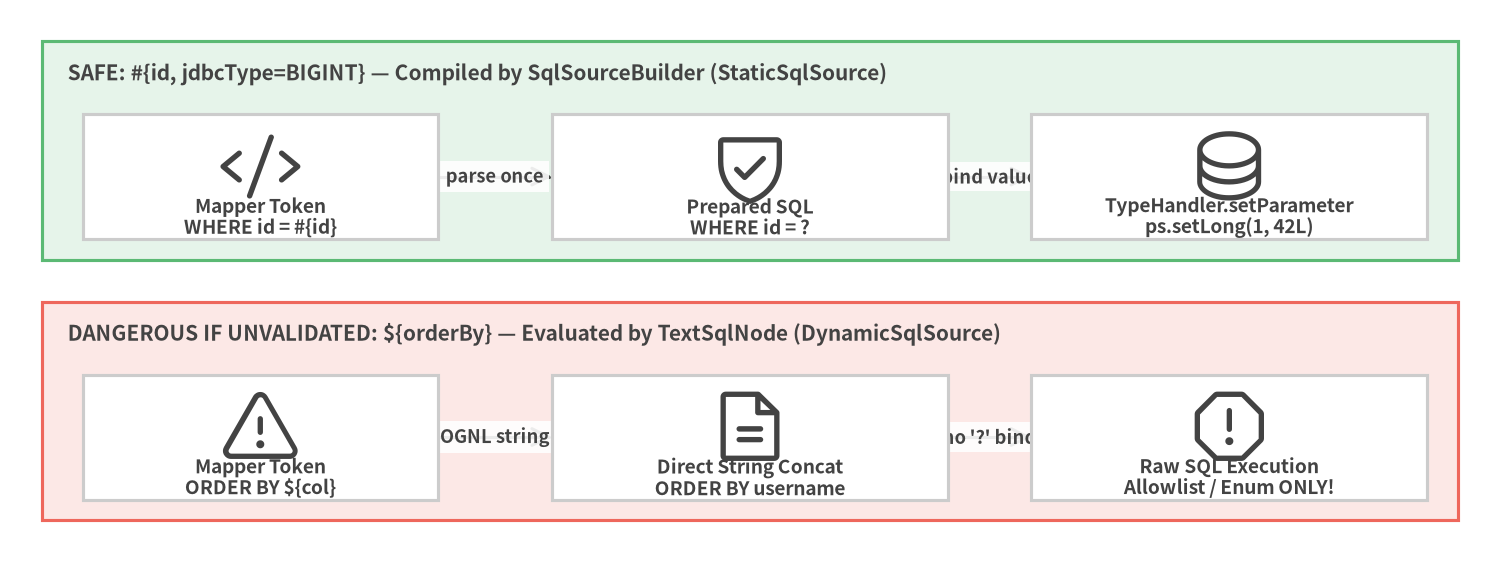
Source Code
from drawlib.canvas import save, setup
from drawlib.diagrams.architecture import ArchitectureDiagram, Node, NodeGroup, PhosphorIcon
from drawlib.styles import Colors, Styles

setup(width=144, height=54, dpi=150)

d = ArchitectureDiagram(
    node_style=Styles.Dark,
    node_text_style=Styles.DarkBold.patch(text_size=9.2),
    edge_style=Styles.Dark.patch(line_width=1.5),
    edge_text_style=Styles.DarkBold.patch(text_size=8.8),
    node_card_style=Styles.Neutral.patch(shape_fill_color=Colors.White),
)

safe = d.add(
    NodeGroup(
        "SAFE: #{id, jdbcType=BIGINT} — Compiled by SqlSourceBuilder (StaticSqlSource)",
        width=136,
        height=21,
        style=Styles.SuccessNeutral,
        text_style=Styles.DarkBold.patch(text_size=10.0, halign="left", valign="top"),
    ),
    xy=(4, 29),
)
n_s1 = safe.add(Node("Mapper Token\nWHERE id = #{id}", icon=PhosphorIcon.CODE, width=34, height=12), xy=(21, 8))
n_s2 = safe.add(Node("Prepared SQL\nWHERE id = ?", icon=PhosphorIcon.SHIELD_CHECK, width=38, height=12), xy=(68, 8))
n_s3 = safe.add(Node("TypeHandler.setParameter\nps.setLong(1, 42L)", icon=PhosphorIcon.DATABASE, width=38, height=12), xy=(114, 8))

risk = d.add(
    NodeGroup(
        "DANGEROUS IF UNVALIDATED: ${orderBy} — Evaluated by TextSqlNode (DynamicSqlSource)",
        width=136,
        height=21,
        style=Styles.DangerNeutral,
        text_style=Styles.DarkBold.patch(text_size=10.0, halign="left", valign="top"),
    ),
    xy=(4, 4),
)
n_r1 = risk.add(Node("Mapper Token\nORDER BY ${col}", icon=PhosphorIcon.WARNING, width=34, height=12), xy=(21, 8))
n_r2 = risk.add(Node("Direct String Concat\nORDER BY username", icon=PhosphorIcon.FILE_TEXT, width=38, height=12), xy=(68, 8))
n_r3 = risk.add(Node("Raw SQL Execution\nAllowlist / Enum ONLY!", icon=PhosphorIcon.WARNING_OCTAGON, width=38, height=12), xy=(114, 8))

n_s1.connect(n_s2, label="parse once")
n_s2.connect(n_s3, label="bind value")
n_r1.connect(n_r2, label="OGNL string")
n_r2.connect(n_r3, label="no '?' bind")

d.draw(xy=(0, 0))
save()
| Syntax | Internal Mechanism | SQL Injection Safe? | When to Use |
|---|---|---|---|
#{prop} |
Replaced with ? by SqlSourceBuilder; bound via TypeHandler.setParameter(ps, i, val) |
Yes (100% Safe) | 99% of all parameters (WHERE, VALUES, SET, LIMIT, LIKE). |
${prop} |
Concatenated directly into the SQL string by TextSqlNode before prepareStatement |
No (Vulnerable if untrusted) | Dynamic table names or ORDER BY column identifiers validated against a strict Java enum or allowlist. |
Optional Attributes Inside #{}
You can fine-tune parameter binding inside #{} tokens:
#{amount, javaType=java.math.BigDecimal, jdbcType=NUMERIC, numericScale=2, typeHandler=com.example.MoneyTypeHandler}
<insert>, <update>, <delete> & Auto-Generated Keys
DML statements return the int or long row count affected by executeUpdate(), or boolean (rows > 0). To populate database-generated primary keys back onto your parameter object, MyBatis supports two mechanisms:
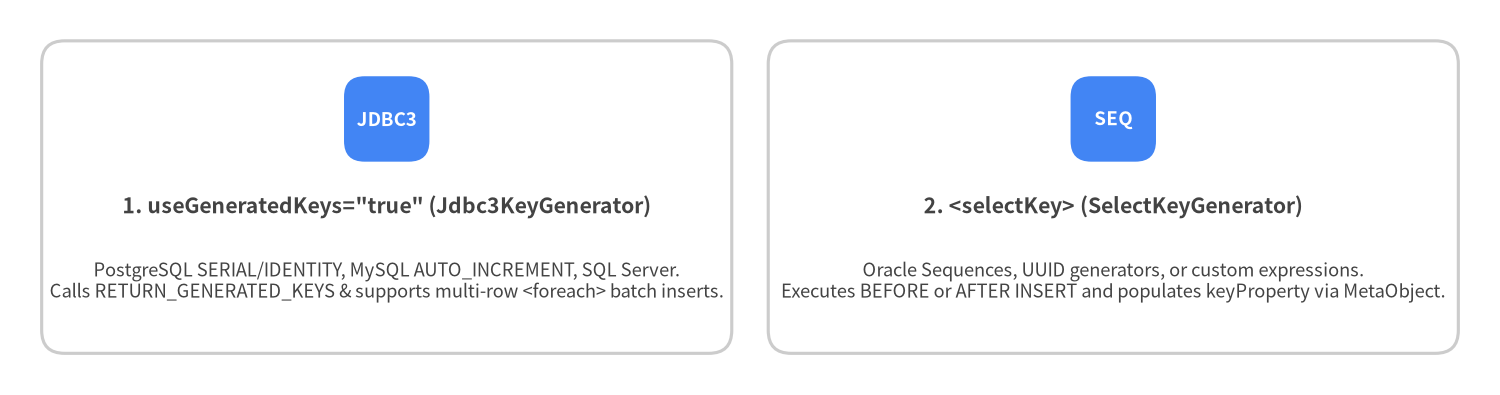
Source Code
from drawlib.canvas import save, setup
from drawlib.smartarts import CardList
from drawlib.styles import Colors, Styles

setup(width=144, height=38, dpi=150)

cards = CardList(
    style=Styles.Neutral.patch(shape_fill_color=Colors.White),
    text_style=Styles.DarkBold.patch(text_size=10.2),
    description_style=Styles.Dark.patch(text_size=8.8),
    badge_shape="rounded_rect",
    badge_style=Styles.PrimaryFlat,
    badge_text_style=Styles.WhiteBold.patch(text_size=9.0),
    direction="horizontal",
    spacing=3.5,
)

cards.add(
    '1. useGeneratedKeys="true" (Jdbc3KeyGenerator)',
    "PostgreSQL SERIAL/IDENTITY, MySQL AUTO_INCREMENT, SQL Server.\nCalls RETURN_GENERATED_KEYS & supports multi-row <foreach> batch inserts.",
    badge_text="JDBC3",
)
cards.add(
    "2. <selectKey> (SelectKeyGenerator)",
    "Oracle Sequences, UUID generators, or custom expressions.\nExecutes BEFORE or AFTER INSERT and populates keyProperty via MetaObject.",
    badge_text="SEQ",
)

cards.draw((4.0, 4.0), width=136.0, height=30.0, align="bottom_left")
save()
Pattern 1: useGeneratedKeys="true" (PostgreSQL, MySQL, MariaDB, H2, SQL Server)
<insert id="insertAuthor"
        useGeneratedKeys="true"
        keyProperty="id"
        keyColumn="id">
  INSERT INTO authors (username, email, created_at)
  VALUES (#{username}, #{email}, #{createdAt})
</insert>
It also works seamlessly with multi-row <foreach> inserts when you pass a List<Author>:
<insert id="insertAuthorsBatch"
        useGeneratedKeys="true"
        keyProperty="id"
        keyColumn="id">
  INSERT INTO authors (username, email, created_at)
  VALUES
  <foreach item="author" collection="list" separator=",">
    (#{author.username}, #{author.email}, #{author.createdAt})
  </foreach>
</insert>
Pattern 2: <selectKey> (Oracle Sequences & Custom ID Expressions)
<insert id="insertAuthorWithSequence">
  <selectKey keyProperty="id" resultType="long" order="BEFORE">
    SELECT author_seq.NEXTVAL FROM dual
  </selectKey>
  INSERT INTO authors (id, username, email)
  VALUES (#{id}, #{username}, #{email})
</insert>
Passing Multiple Parameters with @Param
When a Mapper method accepts more than one parameter, always annotate each parameter with @Param("...") so XML statements can reference them by clear names (rather than positional #{param1}, #{param2}):
List<Post> findByAuthorAndStatus(
    @Param("authorId") long authorId,
    @Param("status") PostStatus status,
    @Param("limit") int limit);
<select id="findByAuthorAndStatus" resultType="Post">
  SELECT id, author_id, title, status, published_at
  FROM posts
  WHERE author_id = #{authorId}
    AND status = #{status}
  ORDER BY published_at DESC
  LIMIT #{limit}
</select>