5. Dynamic SQL & OGNL Tags
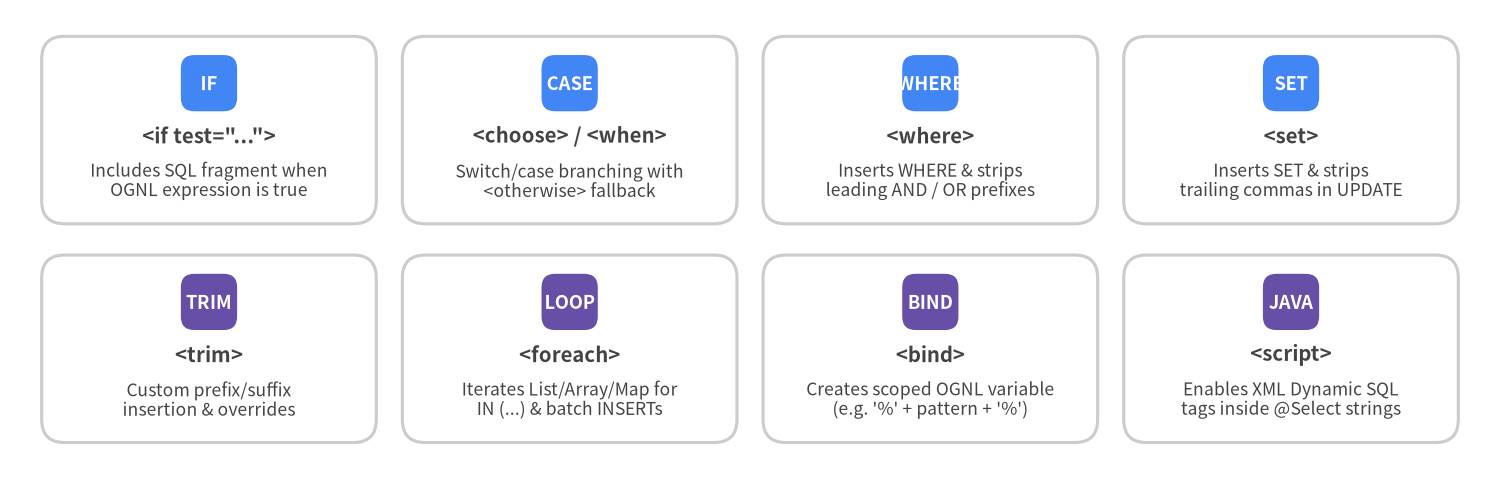
One of the primary reasons developers choose MyBatis over raw JDBC or JPA Criteria APIs is its declarative Dynamic SQL engine. Using 8 XML tags backed by OGNL (Object-Graph Navigation Language) expressions, MyBatis eliminates manual AND/OR/comma string-trimming bugs while still compiling every parameter into safe ? PreparedStatement placeholders.
The 8 Dynamic SQL Tags at a Glance
Source Code
from drawlib.canvas import save, setup
from drawlib.smartarts import CardList
from drawlib.styles import Colors, Styles

setup(width=144, height=46, dpi=150)

row1 = CardList(
    style=Styles.Neutral.patch(shape_fill_color=Colors.White),
    text_style=Styles.DarkBold.patch(text_size=9.8),
    description_style=Styles.Dark.patch(text_size=8.4),
    badge_shape="rounded_rect",
    badge_style=Styles.PrimaryFlat,
    badge_text_style=Styles.WhiteBold.patch(text_size=8.8),
    direction="horizontal",
    spacing=2.5,
)
row1.add('<if test="...">', "Includes SQL fragment when\nOGNL expression is true", badge_text="IF")
row1.add("<choose> / <when>", "Switch/case branching with\n<otherwise> fallback", badge_text="CASE")
row1.add("<where>", "Inserts WHERE & strips\nleading AND / OR prefixes", badge_text="WHERE")
row1.add("<set>", "Inserts SET & strips\ntrailing commas in UPDATE", badge_text="SET")
row1.draw((4.0, 24.5), width=136.0, height=18.0, align="bottom_left")

row2 = CardList(
    style=Styles.Neutral.patch(shape_fill_color=Colors.White),
    text_style=Styles.DarkBold.patch(text_size=9.8),
    description_style=Styles.Dark.patch(text_size=8.4),
    badge_shape="rounded_rect",
    badge_style=Styles.SecondaryFlat,
    badge_text_style=Styles.WhiteBold.patch(text_size=8.8),
    direction="horizontal",
    spacing=2.5,
)
row2.add("<trim>", "Custom prefix/suffix\ninsertion & overrides", badge_text="TRIM")
row2.add("<foreach>", "Iterates List/Array/Map for\nIN (...) & batch INSERTs", badge_text="LOOP")
row2.add("<bind>", "Creates scoped OGNL variable\n(e.g. '%' + pattern + '%')", badge_text="BIND")
row2.add("<script>", "Enables XML Dynamic SQL\ntags inside @Select strings", badge_text="JAVA")
row2.draw((4.0, 3.5), width=136.0, height=18.0, align="bottom_left")

save()
<where> + <if> + <bind>: Multi-Filter Search Pattern
Without <where>, conditionally omitting the first filter leaves invalid SQL such as SELECT * FROM posts WHERE AND status = 'PUBLISHED'. The <where> tag (WhereSqlNode) automatically prepends WHERE only if at least one inner <if> produces SQL, and strips any leading AND or OR prefix:
<select id="searchPosts" resultType="Post">
<if test="titleQuery != null and titleQuery != ''">
<bind name="titlePattern" value="'%' + titleQuery.trim() + '%'"/>
</if>
SELECT id, author_id, title, status, published_at
FROM posts
<where>
<if test="authorId != null">
AND author_id = #{authorId}
</if>
<if test="status != null">
AND status = #{status}
</if>
<if test="titleQuery != null and titleQuery != ''">
AND title ILIKE #{titlePattern}
</if>
<if test="publishedAfter != null">
AND published_at >= #{publishedAfter}
</if>
</where>
ORDER BY published_at DESC
</select>
<choose>, <when>, <otherwise>: Mutually Exclusive Branches
When you want switch/case semantics—applying only the first matching condition—use <choose>:
<select id="findFeaturedPosts" resultType="Post">
SELECT id, author_id, title, status, view_count
FROM posts
<where>
status = 'PUBLISHED'
<choose>
<when test="postId != null">
AND id = #{postId}
</when>
<when test="authorId != null">
AND author_id = #{authorId}
</when>
<otherwise>
AND view_count >= 1000
</otherwise>
</choose>
</where>
</select>
<set>: Partial UPDATE Statements
When updating only non-null fields on a patch DTO, <set> (SetSqlNode) automatically inserts SET and strips the trailing comma , from the last active column:
<update id="updateAuthorPatch">
  UPDATE authors
  <set>
    <if test="username != null">username = #{username},</if>
    <if test="email != null">email = #{email},</if>
    <if test="bio != null">bio = #{bio},</if>
    updated_at = CURRENT_TIMESTAMP
  </set>
  WHERE id = #{id}
</update>
Custom <trim> Equivalents
Both <where> and <set> are specialized subclasses of TrimSqlNode. You can express custom trimming rules directly via <trim>:
<!-- Equivalent to <where> -->
<trim prefix="WHERE" prefixOverrides="AND |OR ">
  ...
</trim>

<!-- Equivalent to <set> -->
<trim prefix="SET" suffixOverrides=",">
  ...
</trim>
<foreach>: Safe IN (...) Clauses & Multi-Row Batch Inserts
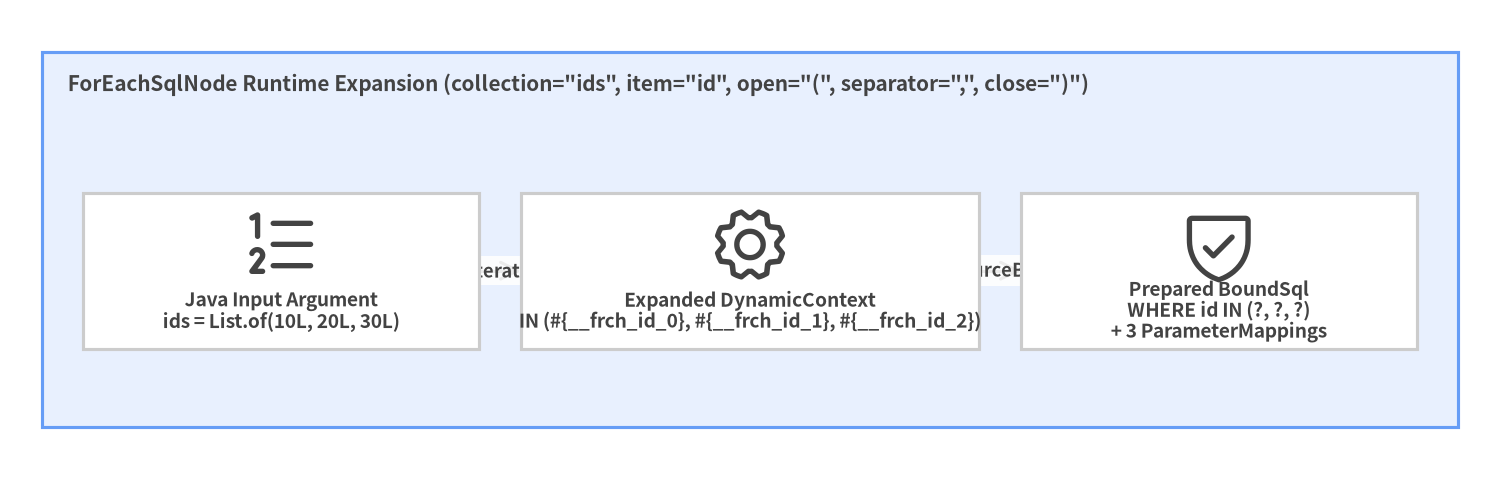
ForEachSqlNode iterates over any Iterable (List, Set), Java array, or Map, generating unique indexed parameter placeholders (#{__frch_id_0}, #{__frch_id_1}, ...) and binding each element safely via TypeHandler:
Source Code
from drawlib.canvas import save, setup
from drawlib.diagrams.architecture import ArchitectureDiagram, Node, NodeGroup, PhosphorIcon
from drawlib.styles import Colors, Styles

setup(width=144, height=46, dpi=150)

d = ArchitectureDiagram(
    node_style=Styles.Dark,
    node_text_style=Styles.DarkBold.patch(text_size=9.2),
    edge_style=Styles.Dark.patch(line_width=1.5),
    edge_text_style=Styles.DarkBold.patch(text_size=8.8),
    node_card_style=Styles.Neutral.patch(shape_fill_color=Colors.White),
)

grp = d.add(
    NodeGroup(
        "ForEachSqlNode Runtime Expansion (collection=\"ids\", item=\"id\", open=\"(\", separator=\",\", close=\")\")",
        width=136,
        height=36,
        style=Styles.PrimaryNeutral,
        text_style=Styles.DarkBold.patch(text_size=10.0, halign="left", valign="top"),
    ),
    xy=(4, 5),
)
n_in = grp.add(Node("Java Input Argument\nids = List.of(10L, 20L, 30L)", icon=PhosphorIcon.LIST_NUMBERS, width=38, height=15), xy=(23, 15))
n_exp = grp.add(Node("Expanded DynamicContext\nIN (#{__frch_id_0}, #{__frch_id_1}, #{__frch_id_2})", icon=PhosphorIcon.GEAR, width=44, height=15), xy=(68, 15))
n_ps = grp.add(Node("Prepared BoundSql\nWHERE id IN (?, ?, ?)\n+ 3 ParameterMappings", icon=PhosphorIcon.SHIELD_CHECK, width=38, height=15), xy=(113, 15))

n_in.connect(n_exp, label="iterate")
n_exp.connect(n_ps, label="SqlSourceBuilder")

d.draw(xy=(0, 0))
save()
<select id="findPostsByIds" resultType="Post">
  SELECT id, author_id, title, status
  FROM posts
  WHERE id IN
  <foreach item="id" index="idx" collection="ids"
           open="(" separator="," close=")" nullable="false">
    #{id}
  </foreach>
</select>
[!WARNING] Calling
<foreach>with an emptyListproducesWHERE id IN(orWHERE id IN ()), which is a syntax error in SQL! Either guard the call in Java (if (ids.isEmpty()) return List.of();) or wrap the clause in<if test="ids != null and !ids.isEmpty()">.